ReferencePage 08 of 14
Authentication
QR/device sign-in, providers, saved accounts, profile PINs, and token lifecycle in OpenNOW
On this page9 sections
OpenNOW signs in to NVIDIA and alliance partner accounts with the OAuth 2.0 device authorization flow. You approve the sign-in on your provider's own page, either by scanning a QR code or by opening the page in your browser. OpenNOW never sees your password. The Rust core owns provider discovery, the device flow, token refresh, and session storage. The Qt shell starts and displays the flow over the shell/core protocol.
Provider discovery#
On startup the core fetches available login providers from:
Each provider entry includes an idpId, a provider code, a display name, a streaming service base URL, and a priority. Providers are sorted by priority, and NVIDIA is the default. Alliance partners such as LG U+, Taiwan Mobile, and bro.game run their own servers. The provider code BPC is shown as bro.game. If discovery fails, the sign-in screen shows the known providers and offers Refresh providers.
For the Digevo alliance provider, the core falls back to latam-west.dig.geforcenow.nvidiagrid.net when the advertised streaming host does not resolve.
 In the app · Sign in › Provider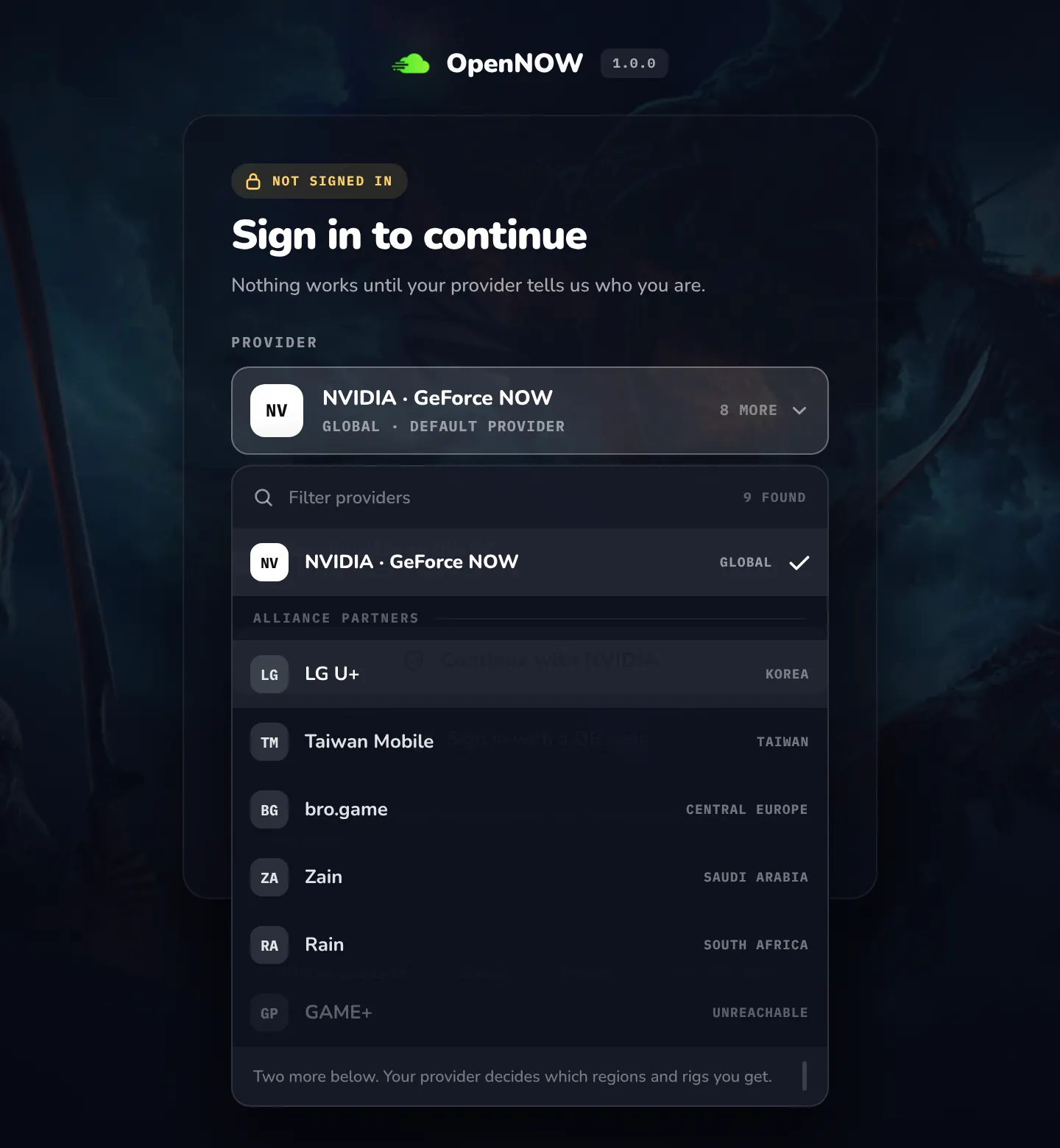
Sign-in flow#
- Choose a provider on the sign-in screen. Stay signed in on this PC is on by default.
- The core requests device authorization from
https://login.nvidia.com/device/authorizewith the Steam Deck NVIDIA client ID, the device ID, the display nameOpenNOW, and the selected provider'sidp_id. - NVIDIA returns a
device_code,user_code,verification_uri,verification_uri_complete, a lifetime (600 seconds if not given, at most 3600), and a poll interval (5 seconds if not given). - The shell shows
verificationUriCompleteas a QR code and the user code next to it. Open sign-in page opens the same page in your browser. - The shell polls until NVIDIA reports the request as authorized, denied, or expired. The core exchanges the device code at
https://login.nvidia.com/token. - When the request is authorized, the core reads the user profile and creates the session. With Stay signed in on this PC off, the session is kept in memory only.
- Cancelling or expiring an attempt removes it. Your previous account state is unchanged.
If your computer's clock differs from GeForce NOW's by more than five minutes, no attempt is created: the request fails and OpenNOW asks you to turn on automatic date and time, then sign in again.
Key constants
| Item | Value |
|---|---|
| Device client ID | q61ddeJrVt7O90Nl-P-N7I36yctih4Ml6FyXLrb6j-U |
| Scopes | openid consent email tk_client age |
| Device authorize URL | https://login.nvidia.com/device/authorize |
| Token URL | https://login.nvidia.com/token |
| Client-token URL | https://login.nvidia.com/client_token |
| Userinfo URL | https://login.nvidia.com/userinfo |
| Device flow Origin header | https://play.geforcenow.com |
| Userinfo Origin header | https://nvfile |
Token management#
The core keeps a list of saved accounts in accounts.json in the OpenNOW data directory. That file has no tokens. Tokens go to the OS credential store under the service name app.opennow.auth. On Windows, tokens are encrypted files in secure-sessions/, and the encryption key is kept in Credential Manager. If the credential store is unavailable or locked, OpenNOW falls back to unencrypted JSON files in fallback-sessions/ and warns that tokens are saved unencrypted on disk. Unlock the keychain and restart when you can. On a Steam Deck, a session is written to and read from the unencrypted JSON file in fallback-sessions/ as the normal path, and no unencrypted-tokens warning is shown. dev also copies an existing keyring session into that file once, when the entry is already unlocked and no local file exists, without asking you to unlock anything. Legacy auth-state.json and sessions/*.json files are migrated and then removed.
Saved session data includes:
- Selected provider
- Access, ID, refresh, and client tokens with expiry timestamps
- Resolved user profile
The core renews a token when it is within 10 minutes of expiry, and a client token within 5 minutes. It tries the client token first and then the refresh token. If renewal fails while the old token is still valid, OpenNOW keeps using it and retries later. If NVIDIA reports the token as revoked or invalid, the saved account is removed and you must sign in again.
The core refreshes tokens before they expire. If refresh fails and the token is expired, the saved session is cleared and the user must log in again. Session recovery keeps seat ownership across reconnect paths where the server still owns the session; closing OpenNOW with an active stream disconnects that cloud session after confirmation.
User profile#
User profile claims are extracted from the JWT id_token first. If key fields are missing, OpenNOW falls back to the /userinfo endpoint.
| Claim | Meaning |
|---|---|
sub | Stable user ID |
email | Email address |
preferred_username | Display name (falls back to the part of the email before @) |
gfn_tier | Membership tier (FREE when missing) |
picture | Avatar URL (falls back to a Gravatar URL for the email) |
After a session is available, OpenNOW also calls the MES subscriptions endpoint (https://mes.geforcenow.com/v4/subscriptions) to resolve membership tier, time-allocation fields, storage add-on details, and the entitled stream profiles used by Settings. JWTs do not always include gfn_tier, so the MES result can replace a fallback FREE tier.
Saved accounts and profile PINs#
OpenNOW can keep several accounts signed in on one PC. Settings → Account → Profiles → Manage opens the saved-accounts screen. There you can switch to another account, add an account, forget an account, set or remove a profile PIN, and sign out of all accounts. Signing out of all accounts removes every saved session and every profile PIN. Captures and settings stay on the device.
A profile PIN is a four-digit code that is required before OpenNOW switches to that account. PINs are local to the device and never sent to NVIDIA. They are stored as scrypt hashes in console-profiles-qt.json. After five wrong attempts the PIN locks for 30 seconds, then 1, 5, and 15 minutes for repeated lockouts. An account with a PIN is not restored automatically at startup.
When two or more accounts are saved, OpenNOW opens Who's playing? at launch so you choose an account before the home screen. It also opens when saved accounts exist but none could be restored. The same picker is used for Manage accounts, Settings, and console mode. An expired sign-in is marked on its tile. Turn on Settings → Account → Skip "Who's playing?" (startAsLastUsedAccount) to start as the last-used account instead.
The sidebar has an account switcher that opens with Ctrl+Shift+A from anywhere in the desktop shell. Ctrl+1 through Ctrl+9 switch to the matching saved account, and the command palette has Switch to entries. Every switch checks the profile PIN. If a running session belongs to the current account, OpenNOW asks you to end it before switching.
Linked game accounts#
The Settings account section uses NVIDIA's GraphQL endpoint (https://games.geforce.com/graphql) to discover supported store providers and read the current user's linked and synced accounts. Providers are normalized to stable codes: UPLAY, BATTLENET, EPIC, GAIJIN, STEAM, and XBOX. Bundled provider definitions are used if the provider query fails.
The bundled codes also include GOG. Linking and sync follow the server's feature flags. A store with no supported link or sync action is not shown. Steam stays visible because sync is supported.
Linking uses the ALS API (https://als.geforcenow.com/v1) to request a provider login URL, opens the external browser, and waits for the result on the first free local port of 2259, 6460, 7119, 8870, and 9096. Link, unlink, and resync actions invalidate account-scoped game/library/catalog caches, including proxy-scoped cache keys when a session proxy is configured, so the library can refresh after account changes.
Implementation notes#
- Login orchestration runs in the Rust core, not in QML business logic.
- Pending sign-in attempts are kept in memory. Completed sessions are saved as described in Token management.
- The device authorization request uses Steam Deck device metadata.
- Each account remembers its provider. The preferred streaming region is saved per provider.
- Do not post session files, tokens, or device codes to public issues.
Launch and membership checks#
Before launch, the core checks the game's catalog playability. If the catalog reports UNPLAYABLE_DUE_TO_UPGRADE or UNPLAYABLE_DUE_TO_TIME_CAPPED_LIMIT, OpenNOW stops the launch with "Your GeForce NOW membership does not currently allow this game. Check your membership and available playtime." Patching, maintenance, and unknown availability states get their own messages.
Source areas#
native/opennow-core/(gfn.rs,credential_vault.rs,console_profiles.rs,account_connections.rs): auth, sessions, profile PINs, subscription, and account-connection servicesopennow-qt/: sign-in and account Settings UIdocs/core-protocol.md: shell/core methods used by login and account flows (auth.device.*,auth.accounts.*,auth.pin.*)