ReferencePage 13 of 14
Configuration
Settings keys, defaults, ranges, Settings locations, and local data locations for OpenNOW
On this page8 sections
OpenNOW stores user settings as JSON in settings.json in the OpenNOW data directory. The Rust core owns load, migration, normalization, and save. The Qt Settings pages edit those values over the shell/core protocol.
The core repairs values on every load and write. A choice that is not in the allowed list returns to its default. A number outside its range is clamped. A value of the wrong JSON type returns to its default. Each save first copies the previous valid file to settings.json.bak. If settings.json cannot be parsed, the core loads the backup and renames the broken file to settings.json.corrupt. Keys the Qt app does not know are kept in the file but are not exposed to the UI.
Settings → About & support → Reset all settings restores every default. It keeps the onboarding state.
Qt defaults differ from Electron
Desktop streaming defaults to native NVST (streamClientMode: "native", transportMode: "nvst"). There is no web streamer setting to return to in the Qt app.
Known issues in v1.0.3
Prefer a 4:2:0 color profile. YUV 4:4:4 choices are labeled Coming soon because they are not working correctly. Alliance Partner sign-in remains available, but Alliance Partners may not work correctly. Keep NVIDIA as the fallback when an Alliance stream fails.
File locations#
| Data | Path |
|---|---|
| Settings | %APPDATA%\OpenNOW\settings.json (Windows), ~/Library/Application Support/OpenNOW/settings.json (macOS), $XDG_CONFIG_HOME/OpenNOW/settings.json or ~/.config/OpenNOW/settings.json (Linux), or $OPENNOW_DATA_DIR/settings.json. The previous valid copy is kept as settings.json.bak |
| Accounts and sign-in tokens | accounts.json in the data directory lists saved accounts without tokens. Tokens are kept in the OS credential store; on Windows they are encrypted files in secure-sessions/ with the key in Credential Manager. If the credential store is unavailable, tokens are saved unencrypted in fallback-sessions/. Legacy auth-state.json and sessions/*.json are migrated and removed |
| Profile PINs | console-profiles-qt.json in the data directory (scrypt hashes, local only) |
| Diagnostics | diagnostics/ in the data directory: current.log and previous.log (core), qt-native.log, native-streamer.log, and exported opennow-diagnostics-<timestamp>.txt reports |
| Caches and updates | artwork-cache/, store-cache-v2/, and updates/ (downloaded update packages) in the data directory |
| Screenshots | OpenNOW/Screenshots/ in the system Pictures folder, or $OPENNOW_PICTURES_DIR/OpenNOW/Screenshots/ |
| Recordings | OpenNOW/Recordings/ in the system Pictures folder, or $OPENNOW_PICTURES_DIR/OpenNOW/Recordings/ |
Set OPENNOW_DATA_DIR to use a different data directory. On Linux, if ~/.config/OpenNOW does not exist but an older ~/.config/opennow directory does, the core keeps using the older directory. The Flatpak build keeps its data inside the sandbox, under ~/.var/app/io.github.opencloudgaming.OpenNOW/.
Diagnostics live under diagnostics/ in the data directory. The core writes current.log and keeps the previous run in previous.log (5 MiB limit per file). The Qt app writes qt-native.log and the embedded streamer writes native-streamer.log.
Video and stream#
Settings locations below refer to the desktop Settings screen. Rows marked "Advanced" are under the page's Advanced disclosure.
| Setting | Type | Default | Description |
|---|---|---|---|
resolution | string | "1920x1080" | Stream resolution as WIDTHxHEIGHT. Width 640–7680 and height 480–4320, both even; other values reset to the default. Settings → Stream |
fps | number | 60 | Target frame rate, clamped to 30–360. Settings offers 30, 60, 90, 120, 144, 165, 240, and 360. Rates your membership or decoder does not allow are locked. Settings → Stream → Frame rate |
maxBitrateMbps | number | 75 | Maximum requested bitrate in Mbps, 0.22–200, rounded to 0.01. Settings → Stream → Bitrate |
saveBandwidth | boolean | false | Lets the server trade resolution and image quality for a steadier frame rate when the connection cannot sustain the selected profile. Applies to new sessions. Settings → Stream → Save bandwidth |
codec | string | "auto" | auto, av1, h265, or h264. Codecs the detected decoder cannot handle are disabled. H.264 allows only 8bit_420, and AV1 allows only 4:2:0 color. Settings → Stream → Codec |
fallbackCodec | string | "auto" | auto, h264, or h265. Used when the preferred codec is not offered. Shown only in console-mode Settings |
colorQuality | string | "8bit_420" | 8bit_420, 10bit_420, 8bit_444, or 10bit_444. The 4:4:4 choices are labeled Coming soon. 10-bit color requires a Performance or Ultimate membership. Settings → Stream → Color quality |
dlssOverrides | object | {"srMode":0,"srModel":0,"srScale":100,"rrModel":0,"fgMode":0,"fgModel":0,"fgMultiplier":0} | Cloud DLSS overrides the core sends with the next session. 0 leaves that feature to the game. srMode is In-game 0 or DLAA 5 (scale 100), Quality 3 (67), Balanced 2 (58), Performance 1 (50), Ultra Performance 4 (33), or Custom 6 (srScale 33–100, 75 if missing). srModel is 0–14, rrModel is 0–7, and fgModel is 0–3. Settings labels 0 In-game and 1 Recommended. Super Resolution offers presets A–F and J–M. Ray Reconstruction offers 0, 1, 5, and 7. Frame Generation offers 0–3. fgMode is In-game 0 or Dynamic 1. fgMultiplier is 0 unless frame generation is Dynamic, then 3, 4, 5, or 6. A model left at 0 also leaves its mode to the game. The control offers Dynamic frame generation only when the membership entitles frame generation and at least one multiplier, and it disables multipliers the membership does not include. Separate from frameGeneration. Settings → Stream → DLSS overrides, directly after Color quality |
streamClientMode | string | "native" | Always native |
transportMode | string | "nvst" | Always nvst. The core rewrites any other value on load |
nativeVideoBackend | string | "auto" | auto, d3d11, d3d12, nvdec, cuda, vaapi, v4l2, vulkan, videotoolbox, or software. Settings lists only the backends available on your platform. Applies to the next stream. Settings → Stream → Advanced → Video backend |
audioOutputDevice | string | "" | Opaque audio output ID; empty means the system default. Applies to the next session. Settings → Audio → Output device |
windowsGpuDeviceId | string | "" | Selected GPU; empty means the first GPU that can hardware-decode. Applies after restarting OpenNOW. Settings → Stream → Graphics processor (shown when more than one GPU is available) |
enableHdr | boolean | false | Requests HDR10. Requires a Performance or Ultimate membership and a 10-bit H.265 or AV1 hardware decoder. A store version whose catalog entry does not list HDR streams in SDR, with a one-time Streaming in SDR notice for that game; the setting stays on and unknown catalog data keeps the HDR request. Settings → Stream → HDR |
upscaling | string | "off" | off, metalfx (macOS), or fsr1 (Windows and Linux). Settings → Stream → Upscaling |
upscalingSharpness | number | 10 | Clarity, 0–15. MetalFX sharpens before upscaling; FSR 1 sharpens after. Settings → Stream → Clarity |
upscalingDenoise | number | 0 | Noise reduction, 0–20, before MetalFX upscaling. macOS only. Settings → Stream → Noise Reduction |
frameGeneration | string | "off" | off or 2x. Targets 120 displayed FPS from a 60 FPS stream. Settings → Stream → Frame generation (Experimental) |
region | string | "" | Preferred region URL; empty means automatic (lowest latency). The core remembers one region per sign-in provider. Settings → Network → Server region |
sessionProxyEnabled | boolean | false | Sends API calls through the proxy in sessionProxyUrl. The stream itself always connects directly. Settings → Network → Advanced → Use proxy |
sessionProxyUrl | string | "" | http://, https://, socks4://, or socks5:// URL with host and port. Settings → Network → Advanced → Proxy address |
enableL4S | boolean | false | Requests scalable low-latency transport for the next session. Settings → Network → Advanced → L4S |
networkTest | boolean | false | Measures UDP payload reachability of the selected zone before streaming. Settings → Network → Advanced → Network test |
webrtcCompatibilityMode | string | "auto" | auto, on (WebRTC), or off (NVST). Auto uses WebRTC for signed-in alliance accounts and NVST for NVIDIA accounts. Applies to new sessions. See Protocol notes. Settings → Network → Advanced → WebRTC compatibility mode |
suppressAwdlWhileStreaming | boolean | false | macOS only. Turns off AWDL while a stream is active to reduce Wi-Fi latency spikes. Interrupts AirDrop, AirPlay, Sidecar, and other Continuity features until the stream ends. Needs a privileged helper that you install once with administrator approval. Settings → Network → macOS Wi-Fi |
enableCloudGsync | boolean | false | Requests Cloud G-Sync (variable refresh) and NVIDIA Reflex. Reflex is also requested at 120 FPS and above. Labeled Reflex low latency in Settings → Stream and Cloud G-Sync in console-mode Settings |
identifyAsSteamDeck | boolean | false | Advertises a Steam Deck client to unlock Deck resolutions and 90 FPS. Refreshes entitlements. On Steam Deck hardware (DMI board vendor Valve, product Jupiter or Galileo) OpenNOW turns it on once by itself, and a value you set is never overwritten. Settings → Stream → Advanced → Steam Deck identity |
steamBigPictureMode | boolean | false | Requests gamepad-friendly launchers such as Steam Big Picture. Applies to new sessions. Settings → Stream → Steam Big Picture mode |
enablePersistingInGameSettings | boolean | true | Keeps in-game graphics settings between sessions for supported games and memberships. Applies to new sessions. Settings → Stream → Persistent in-game settings |
muteWhenOutOfFocus | boolean | false | Mutes stream audio while OpenNOW is in the background. Settings → Audio → Mute when out of focus |
backgroundStreamReminder | boolean | false | Requests taskbar or dock attention every 5 minutes while a stream runs in the background. Does not prevent AFK timeouts. Settings → Stream → Background stream reminder |
suppressTenBitWarning | boolean | false | Hides the one-time 10-bit color warning after you dismiss it |
hideQueueSelector | boolean | false | Hide the free-tier queue selector (PrintedWaste-backed estimates when capability allows) |
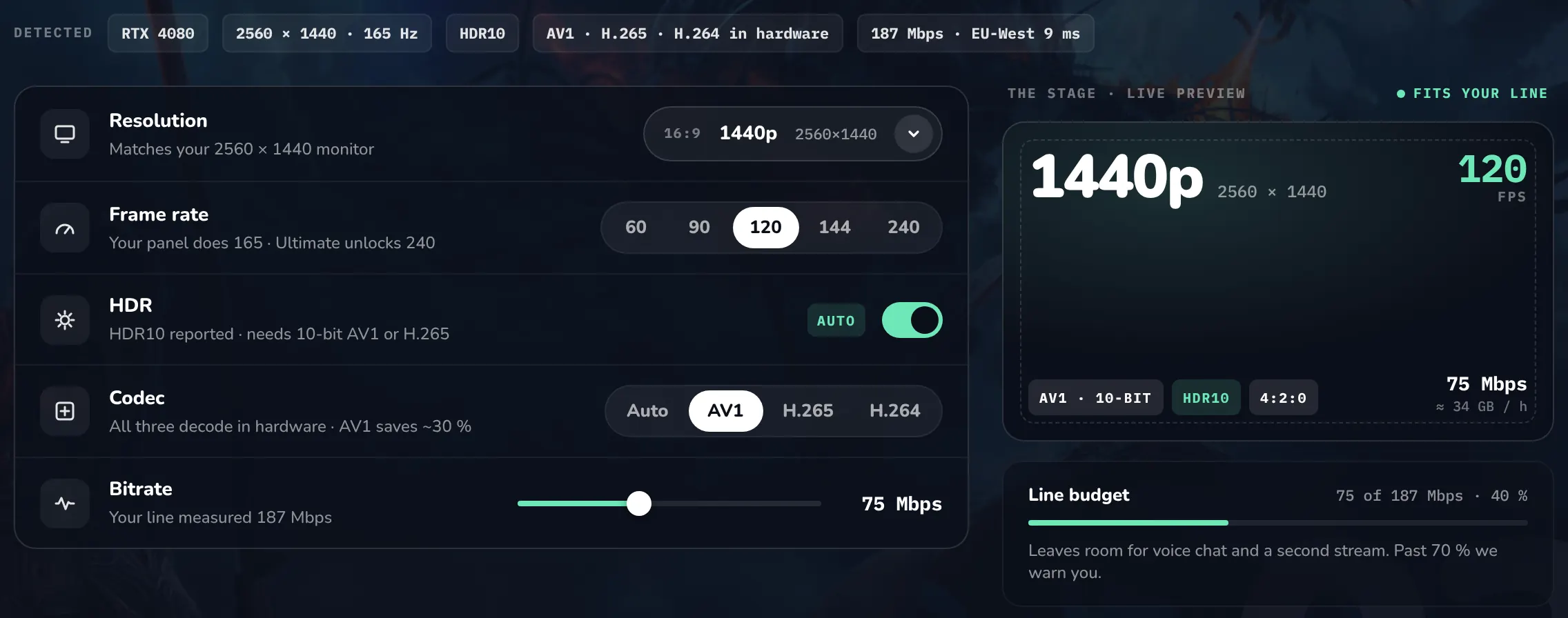
 In the app · Onboarding › Pick your picture
 In the app · Console mode › Settings › Streaming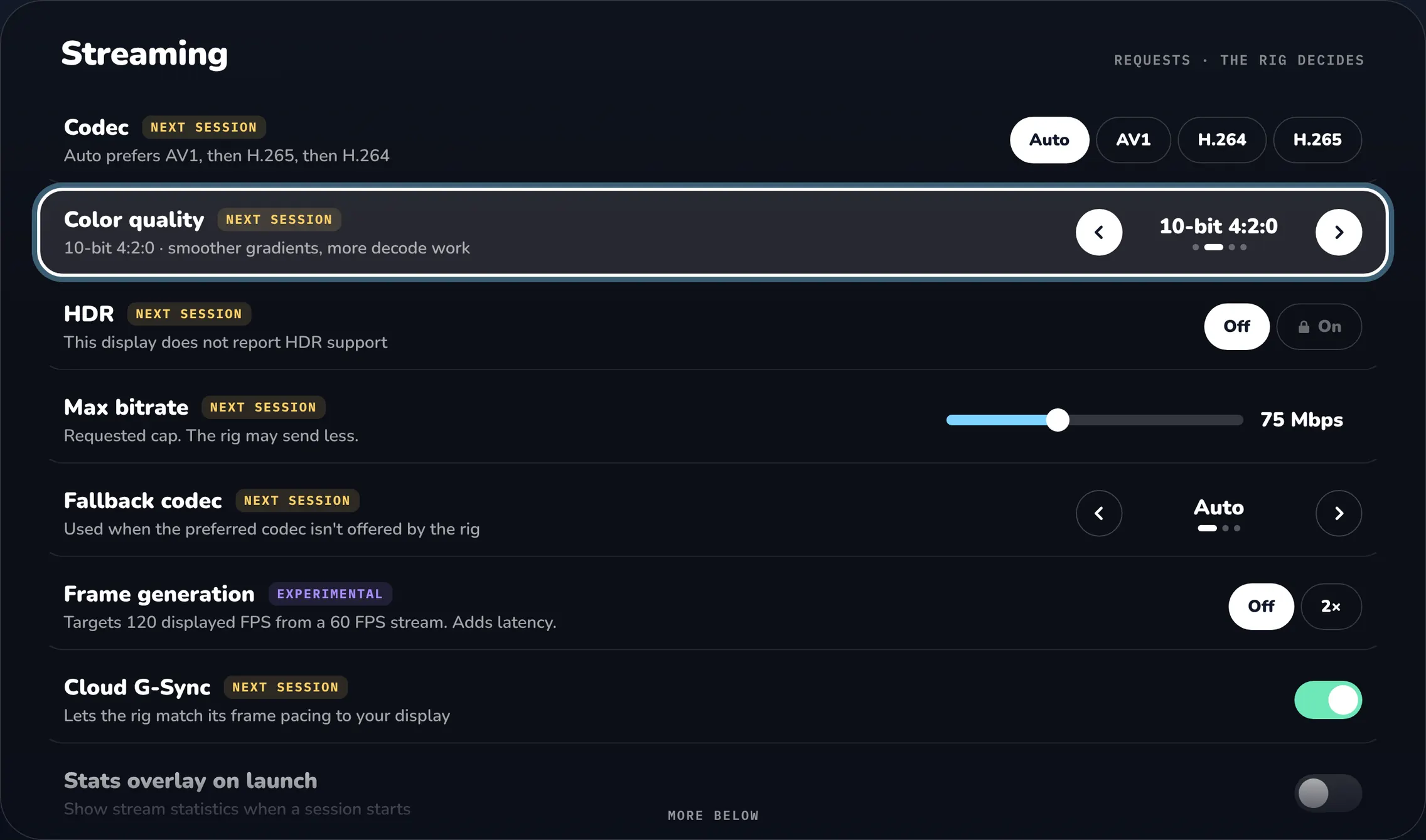
Capture and recording#
| Setting | Type | Default | Description |
|---|---|---|---|
replayBufferEnabled | boolean | false | Keeps recent source video and audio in memory so you can save a clip. Enabling takes effect next session; disabling clears the buffer immediately. Settings → Recording → Enable replay buffer |
replayBufferSeconds | number | 30 | Target clip length, 15–120 seconds. Memory limits and keyframe spacing can shorten a clip. Settings → Recording → Replay duration |
replayBufferMemoryMiB | number | 256 | Memory limit for buffered media, 64–512 MiB. Higher bitrates fill it sooner. Settings → Recording → Replay memory limit |
Recordings and clips copy the incoming stream without re-encoding, so they use the stream's resolution, frame rate, and bitrate. The keys recordingResolution ("720p"), recordingFps (30), and recordingBitrateMbps (null) still exist in settings.json, but v1.0.3 does not read them. Recordings are Matroska (.mkv) files under the OpenNOW Pictures folder. See Media.
Input and shortcuts#
Stream shortcuts are edited in Settings → Controls → Shortcuts. The page has search, reset to default, and clear. A cleared shortcut sends its key to the game. Ctrl+G and Shift+F3 are reserved and cannot be assigned, and one chord cannot belong to two commands. See Input for the fixed shortcuts.
| Setting | Type | Default | Description |
|---|---|---|---|
clipboardPaste | boolean | false | Pastes local text into the stream with Ctrl+V (Command+V on macOS), up to 64 KiB per paste. Settings → Controls → Clipboard paste |
mouseSensitivity | number | 1 | Multiplier for relative mouse movement, 0.1–3.0. v1.0.3 passes it only to the external renderer process, not to the embedded stream view. Settings → Controls → Mouse sensitivity |
macPointerLockEnabled | boolean | true | macOS only. Keeps the mouse captured for the stream view so it cannot leave the window. F8 or the Ctrl+G menu's Pointer lock row toggles and saves it. dev adds this key; v1.0.3 has no pointer-lock setting and follows the game's cursor messages. Settings → Controls → Pointer lock |
keyboardLayout | string | "en-US" | Match your physical keyboard. Sent to GeForce NOW at session start; restart or resume after changing. See Input for the 21 values. Settings → Controls → Keyboard layout |
gameLanguage | string | "en_US" | Language requested for game metadata and the session. Settings → Controls → Game language |
shortcutToggleStats | string | "Ctrl+N" | Stats overlay |
shortcutTogglePointerLock | string | "F8" | Grab or release the mouse |
shortcutToggleFullscreen | string | "F11" | Toggle fullscreen |
shortcutScreenshot | string | "Ctrl+F11" | Screenshot the stream |
shortcutToggleRecording | string | "F12" | Toggle recording |
shortcutSaveClip | string | "Ctrl+F12" | Save replay clip |
shortcutStopStream | string | "Ctrl+Shift+Q" | End the session (asks for confirmation) |
shortcutToggleAntiAfk | string | "Ctrl+Shift+K" | Toggle Anti-AFK |
shortcutToggleMicrophone | string | "Ctrl+Shift+M" | Toggle microphone. Active only when the microphone mode is voice-activity |
microphoneMode | string | "disabled" | disabled or voice-activity (labeled Open microphone). Applies to the next session. Settings → Audio → Microphone |
controllerMode | boolean | true | Lets controllers drive the OpenNOW interface outside gameplay. Settings → Controls → Controller input |
controllerLeftStickDeadzone | number | 5 | Left-stick dead zone in percent, 0–50. Settings → Controls → Left stick dead zone |
controllerRightStickDeadzone | number | 5 | Right-stick dead zone in percent, 0–50. Settings → Controls → Right stick dead zone |
controllerVibrationIntensity | number | 100 | Vibration strength in percent, 0–100. Settings → Controls → Controller vibration |
controllerProfiles | object | {} | Per-controller dead zones and vibration, keyed by controller. A controller without its own values uses the three settings above. Edited in the Ctrl+G drawer under Controllers |
forwardFlightControls | boolean | true | Forwards supported flight sticks, throttles, pedals, and wheels to the game as the real HID device instead of an Xbox controller. Settings → Controls → Forward flight sticks and wheels as native devices |
enableGyroscopeControls | boolean | false | Settings → Controls → Gyroscope. v1.0.3 stores this toggle but does not send motion data |
Statistics and session overlays#
| Setting | Type | Default | Description |
|---|---|---|---|
showStatsOnLaunch | boolean | false | Shows the statistics overlay when a stream starts. Settings → Stream → Statistics overlay → Show on stream launch |
statsOverlayPosition | string | "top-right" | top-right, top-left, bottom-right, or bottom-left. Settings → Stream → Statistics overlay → Position |
statsOverlayScale | number | 1 | Overlay scale, 0.85–1.5. Settings → Stream → Statistics overlay → Overlay scale |
statsOverlayOpacity | number | 85 | Background opacity in percent, 40–100. Settings → Stream → Statistics overlay → Background opacity |
statsShowFps, statsShowRegion, statsShowPing, statsShowBitrate, statsShowJitter, statsShowDrops, statsShowPacketLoss, statsShowDecode, statsShowLatency, statsShowVideo, statsShowClock, statsShowGraphs | boolean | true | Metrics shown in the overlay. Settings → Stream → Statistics overlay → Customize metrics |
sessionCounterEnabled | boolean | false | Shows a small session timer independently of the statistics overlay. Settings → Stream → Statistics overlay → Standalone session timer |
sessionClockShowEveryMinutes | number | 60 | How often the session clock reappears, 1–240 minutes. Console-mode Settings |
sessionClockShowDurationSeconds | number | 30 | How long the session clock stays visible, 1–120 seconds. Console-mode Settings |
showAntiAfkIndicator | boolean | true | Shows a badge while Anti-AFK is on. Console-mode Settings; desktop Settings → Stream |
antiAfkReminderEveryMinutes | number | 15 | With the indicator hidden, how often the reminder reappears, 1–120 minutes. Console-mode Settings; desktop Settings → Stream |
antiAfkReminderDurationSeconds | number | 5 | How long each reminder stays visible, 1–60 seconds. Console-mode Settings; desktop Settings → Stream |
showSessionReport | boolean | true | Shows performance and recovery results after a session ends. Console-mode Settings |
Shell, console, and app behavior#
| Setting | Type | Default | Description |
|---|---|---|---|
launchInConsoleMode | boolean | false | Starts OpenNOW in console mode. Turning it off also turns off switchToConsoleOnPad. Settings → Console mode → Start in console mode |
switchToConsoleOnPad | boolean | false | Enters console mode when a gamepad is the only input. Ignored while a mouse has moved in the last 30 seconds. Settings → Console mode |
leaveConsoleOnPointer | boolean | true | Leaves console mode on keyboard or mouse input. Settings → Console mode |
startAsLastUsedAccount | boolean | false | Skips Who's playing? at launch and starts as the last-used account. Settings → Account → Skip "Who's playing?" |
autoFullScreen | boolean | true | Enters fullscreen when the session is ready. Settings → Stream → Fullscreen when session is ready |
appTheme | string | "auto" | auto, dark, or light. Choosing a theme pack sets this value. Settings → Appearance → Appearance |
appLanguage | string | "system" | system, de, en, es, fr, ja, ko, nl, pl, ro, ru, tr, or zh. Settings → Appearance → Interface language |
themePack | string | "nocturne" | default, nocturne, aurora, kraft, phosphor, bone, cobalt, hibiscus, or chapel. Settings → Appearance → Theme |
appAccentColor | string | "green" | green, blue, violet, amber, rose, coral, or white. Settings → Appearance → Accent |
translucentUI | boolean | false | Uses translucent shell surfaces when supported. Settings → Appearance → Translucent interface |
desktopUiScale | number | 1 | Interface scale, 0.85–1.25. Settings → Appearance → Interface scale |
posterSizeScale | number | 1.05 | Library tile size, 0.75–1.5. Settings offers 0.9, 1.05, and 1.25. Settings → Appearance → Library tiles |
desktopRailCollapsed | boolean | true | Shows the sidebar as icons only. Ctrl+B toggles it. Settings → Appearance → Collapsed sidebar |
desktopSidebarHover | boolean | true | Expands the sidebar on hover. Settings → Appearance → Sidebar opens on hover |
desktopBackground | string | "art" | art, gradient, solid, or custom. Settings → Appearance → Background |
desktopBackgroundImage | string | "" | file:// URL of the custom background image |
desktopBackgroundOpacity | number | 30 | Custom image opacity in percent, 0–100. Settings → Appearance → Image opacity |
reducedMotion | boolean | false | Cuts parallax and cover animations. Settings → Appearance → Reduce motion |
uiSoundsEnabled | boolean | true | Plays the Game Mode startup sound. Settings → Appearance → UI sounds |
confirmQuitWhenIdle | boolean | true | Asks before closing OpenNOW from the title bar. Off skips that prompt only while idle: nothing launching, streaming, recovering, or waiting to resume. Settings → Appearance → Confirm before quitting |
showTileLabels | boolean | true | Shows game names under tiles. Console-mode Settings |
autoCheckForUpdates | boolean | true | Checks for updates every six hours while no stream is active. Settings → Updates |
autoDownloadUpdates | boolean | false | Downloads verified updates while idle. Installation always asks first. Settings → Updates |
updateChannel | string | build-dependent | stable or nightly. The default follows the build's version. Settings → Updates → Update channel |
discordRichPresence | boolean | false | Shows the streamed game as Discord activity. Settings → Account → Show what I am playing |
errorReportingConsent | string | "unset" | unset, granted, or denied. Settings → Account → Crash reports |
automaticBugReports | string | "unset" | unset, enabled, or disabled. Sends usage statistics and error reports with logs. Starts as disabled if errorReportingConsent is denied. Settings → Account → Usage & bug reports · Experimental |
On desktop, autoCheckForUpdates, autoDownloadUpdates, and updateChannel are edited on Settings → Updates. About & support keeps the version line and an Open Updates button.
Stored but unused in v1.0.3
These keys exist in settings.json and are normalized, but no v1.0.3 Settings page or stream path reads them: aspectRatio ("16:9"), recordingResolution, recordingFps, recordingBitrateMbps, allowEscapeToExitFullscreen (false), hideStreamButtons (false), and hideServerSelector (false). mouseAcceleration (1, range 1–150) and nativeCursorOverlay (true, Settings → Controls → Advanced → Cursor overlay) are read only by the external renderer process. The embedded stream view that the packaged app uses does not read them.
consoleProfilePickerOnLaunch (default true) was a v1.0.2 setting. Settings → Console mode → Controller profile picker ("Choose a saved profile when console mode starts") stored it, and nothing read it. It is no longer a setting in v1.0.3. If startAsLastUsedAccount is missing and the saved value is false, load sets startAsLastUsedAccount to true. The old key stays in the file and is not shown.
Diagnostics#
Use Settings → About & support → Export to write a redacted diagnostic report. The report is saved as opennow-diagnostics-<timestamp>.txt under diagnostics/ in the data directory. It contains the previous and current core logs and bounded tails of native-streamer.log and qt-native.log. Secrets, URLs, tokens, e-mail addresses, and local user paths are redacted. Do not post credentials, tokens, or unredacted account details to public issues.