GuidesPage 02 of 14
Getting Started
Download Qt packages, first launch, and CMake source builds for OpenNOW
On this page5 sections
OpenNOW is an open-source GeForce NOW client. The desktop app is the Qt Quick client in opennow-qt/, with a Rust core and an in-process native NVST streamer. Separate native and mobile builds are available for other platforms.
Desktop is Qt/native
OpenNOW's desktop client replaces the retired Electron/opennow-stable app. The Qt app has no Chromium or browser streaming path. See the announcement for a first look.
Download a release#
These docs describe v1.0.3, published as the Latest release on 2026-10-16. Its packages start with OpenNOW-Qt-1.0.3-. Download them from GitHub Releases or the download picker. Nightly prereleases (vX.Y.Z-nightly.*, currently v1.0.4-nightly.*) are built from dev and use the same file layout, minus the Windows .msi. Historical tags such as v0.5.5 may still contain the retired Electron app.
| Platform | Qt package | How to run it |
|---|---|---|
| Windows x64 / ARM64 | -setup.exe | Installs the portable layout for the current user without administrator rights. v1.0.3 installs to %LOCALAPPDATA%\OpenNOW without asking. dev builds default to that folder and let you choose another one; a reinstall reuses the previous folder. v1.0.3 uninstall deletes the whole install folder, including any file you added to it; dev removes the files setup installed and deletes a folder only when nothing else is left in it. If an MSI copy of OpenNOW is registered, setup offers to uninstall it first |
| Windows x64 / ARM64 | .msi (v1.0.3 and earlier), portable .zip | Install the MSI, or extract the entire ZIP and run bin/OpenNOW.exe. .msi installers are no longer published, so nightlies and later releases ship -setup.exe and .zip only |
| Linux x64 / ARM64 | .AppImage (recommended) | Make the file executable, then launch it. A .AppImage.zsync sidecar is published for external delta-update tools |
| Linux x64 / ARM64 | .deb | Bundles Qt, QML plugins, SDL3, and the media runtime under /opt/opennow. Install with sudo apt install ./OpenNOW-Qt-1.0.3-Linux-x64.deb (or -arm64.deb) so APT installs the remaining system dependencies |
| Linux x64 / ARM64 | .flatpak | Download the bundle from GitHub Releases and install it with flatpak install --user ./<file>, or build it from opennow-qt/packaging/flatpak (app ID io.github.opencloudgaming.OpenNOW). Not published on Flathub. Flatpak installs disable the in-app updater |
macOS 13+ (Apple Silicon; Intel x64 on dev) | .dmg, .zip | Open the DMG and drag OpenNOW into Applications, or extract the ZIP. v1.0.3 ships the Apple Silicon DMG and ZIP only |
| macOS (OpenNOW Mac) | Release .zip | Separate performance-focused macOS build maintained by Jayian1890 |
| Android | Google Play | Stable Android release; separate from the Qt desktop app |
| Android beta | Direct .apk | Sideload the beta only when testing pre-release Android builds |
| iOS | TestFlight beta | Install through Apple's TestFlight while the iOS build is in beta |
| Nintendo Switch | OpenNOW-Switch release | Native Horizon OS homebrew client for modded Switch systems; follow the Switch installation guide |
GitHub Releases include Linux x64 and ARM64 Flatpak bundles, OpenNOW-Qt-<version>-Linux-x64.flatpak and OpenNOW-Qt-<version>-Linux-arm64.flatpak. They are not on Flathub. Install one with flatpak install --user ./OpenNOW-Qt-<version>-Linux-x64.flatpak (use the arm64 file on ARM). Flatpak installs still have no in-app updater.
Signing and updates
Every v1.0.3 package has a sibling <package>.manifest.json with an Ed25519 signature. The built-in updater verifies that signature before it installs an update. Apple Silicon DMG and ZIP builds are Developer ID–signed and notarized. Windows packages are not Authenticode-signed, so SmartScreen or an unknown-publisher warning can appear. SHA256SUMS detects corrupted downloads; it does not verify who published a package.
Settings → Updates has Check for updates, optional automatic checks and downloads, and an Update channel choice (Stable or Nightly). Installing an update always asks for confirmation. v1.0.1 already trusts the same update key, so it can update in-app. v1.0.0 and other builds without the pinned key need one manual install of v1.0.3. Nightlies are not notarized and use ad-hoc macOS signatures, so install manually once when you switch between the stable and nightly channels on macOS. Flatpak builds have no in-app update path.
A status-bar chip appears when an update needs an action, and stays hidden while OpenNOW is up to date. The console update screen is unchanged.
First launch#
- Open OpenNOW and choose your provider: NVIDIA or an alliance partner.
- Select Continue with provider to open the provider's sign-in page in your browser, or Sign in with a QR code to approve the request from another device. Both use device authorization: approve the request, and OpenNOW continues on its own. Stay signed in on this PC keeps the session after restarts. OpenNOW prefers the OS keychain for saved session tokens; if the keychain is unavailable, tokens are saved unencrypted on disk and the sign-in screen says so. A Steam Deck never uses the OS keychain, so its sessions are always saved in that local file. Accounts you signed in to before appear under Saved accounts.
- After sign-in, first-run setup opens. Press
Escor select Skip setup to keep the defaults; Finish and open library saves your choices. Replay it later from Settings → About & support → Replay onboarding. - Browse your library or the public catalog. Add or remove GeForce NOW favorites from the library. Link or resync store accounts under Settings → Account when GeForce NOW needs a store connection for owned games. In the desktop layout, the command palette (
Ctrl+K) searches remote games as well as local commands. - Open Settings to tune the stream. Stream holds resolution, FPS, codec, bitrate, color quality, Save bandwidth, and Persistent in-game settings (
enablePersistingInGameSettings, default on). Resolution and FPS choices follow your GeForce NOW membership. Network holds the server region, free-tier queue selector, L4S, and the API proxy. Appearance holds the interface language (appLanguage). Prefer 8-bit, YUV 4:2:0 color quality: 4:4:4 profiles are labeled Coming soon and do not work yet. Alliance-partner sessions may also fail; this is a known issue in v1.0.3. Save bandwidth (default off) lets the server trade resolution and image quality for a steadier frame rate when your connection cannot sustain the selected profile. - Use the same app in the desktop (keyboard and mouse) or console (controller-first) layout. Console mode is a shell preference, not a separate download. Settings → Console mode has Start in console mode, Enter console mode when a gamepad is the only input (default off), and Leave console mode on keyboard or mouse input (default on).
- Launch a game. When a title has more than one store variant, choose the platform (Steam, Xbox, Epic, and so on) before the session starts. Queue and server-selection screens appear when GeForce NOW requires them; the free-tier queue selector can show PrintedWaste queue data. During launch, OpenNOW names the cloud setup step (for example Waiting for an available rig or Configuring your cloud gaming rig) and then the native connection progress. When a session ends, OpenNOW shows a session report if
showSessionReportis on (default on).
First-run setup is a guided sequence with one decision per step: Mode, Picture, Network, Boost, and Ready. Skip setup keeps the defaults, and Finish and open library saves your choices.
AWDL suppression on macOS is optional. It is off by default and lives in Settings → Network; setup no longer requires it. When two or more accounts are saved, a Who's playing? picker opens at startup, and you can switch accounts without signing out. Each account keeps its own library, membership, and sign-in. To start as the last-used account instead, turn on Skip “Who’s playing?” in Settings → Account.
On Windows, if H.265 is unavailable, Settings links to Microsoft's HEVC Video Extensions (try the free Store offer first). Choosing 10-bit color shows a one-time stuttering warning. If the negotiated video color format differs from the requested profile, OpenNOW shows a one-time Stream color format changed notice and keeps playing. Settings → Audio → Mute when out of focus silences the stream while you use another app. Settings → Stream → Background stream reminder requests taskbar or dock attention every 5 minutes while a stream runs in the background. Discord Rich Presence (discordRichPresence, default off, under Settings → Account) can show the streamed game as your Discord activity.
Some GeForce NOW catalog entries require a specific membership tier. When NVIDIA reports insufficient playability, OpenNOW shows Membership Upgrade Required instead of treating it as a duplicate-session conflict.
Desktop streaming uses the in-process native NVST streamer. There is no web/Chromium streamer to fall back to. Export a diagnostic report through Settings → About & support → Copy diagnostics → Export when something breaks. Report issues on GitHub Issues or Discord.
 In the app · Onboarding › Desk or couch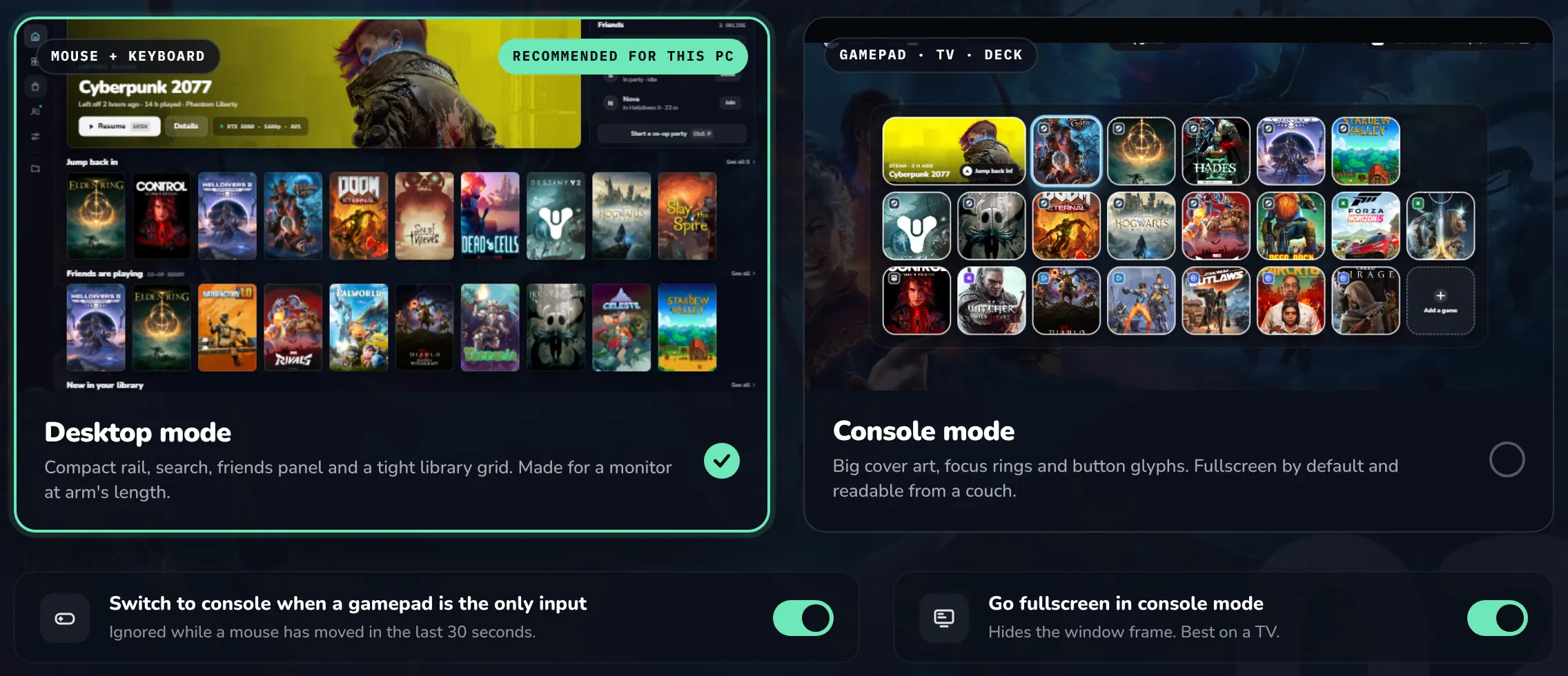
Build from source#
Use main for the stable source (v1.0.3 plus any fixes merged since) or dev for ongoing development. Before building, install:
- Qt 6.8+ with Quick, Quick Controls 2, Multimedia, Network, Test, and ShaderTools
- CMake 3.24+ and a C++20 toolchain
- SDL3, Rust with Cargo, and the media dependencies for your platform
Linux also needs pkg-config, libwayland-dev, and wayland-protocols, even for X11 builds, plus the libva, libva-drm, and libdrm development packages and libclang for the native streamer. ARM64 Linux also needs the libudev development package. You do not need Node.js or npm to build or run the desktop app.
The development executable is normally build/opennow-qt/OpenNOW.exe on Windows and build/opennow-qt/opennow-qt on Linux. See the Qt app guide for platform-specific details, hardware notes, and acceptance checks.
Local data#
| Data | Location |
|---|---|
| Settings | %APPDATA%\OpenNOW\settings.json (Windows), ~/Library/Application Support/OpenNOW/settings.json (macOS), $XDG_CONFIG_HOME/OpenNOW/settings.json or ~/.config/OpenNOW/settings.json (Linux), or $OPENNOW_DATA_DIR/settings.json. The previous valid copy is kept as settings.json.bak |
| Accounts and sign-in tokens | accounts.json in the data directory lists saved accounts without tokens. Tokens are kept in the OS credential store; on Windows they are encrypted files in secure-sessions/ with the key in Credential Manager. If the credential store is unavailable, tokens are saved unencrypted in fallback-sessions/. Legacy auth-state.json and sessions/*.json are migrated and removed |
| Profile PINs | console-profiles-qt.json in the data directory (scrypt hashes, local only) |
| Diagnostics | diagnostics/ in the data directory: current.log and previous.log (core), qt-native.log, native-streamer.log, and exported opennow-diagnostics-<timestamp>.txt reports |
| Caches and updates | artwork-cache/, store-cache-v2/, and updates/ (downloaded update packages) in the data directory |
| Screenshots | OpenNOW/Screenshots/ in the system Pictures folder, or $OPENNOW_PICTURES_DIR/OpenNOW/Screenshots/ |
| Recordings | OpenNOW/Recordings/ in the system Pictures folder, or $OPENNOW_PICTURES_DIR/OpenNOW/Recordings/ |
Close the app before deleting these files to reset local state.
If something goes wrong#
Start with the Troubleshooting guide. It covers NVIDIA-first checks, conservative stream settings, diagnostics export, and local reset instructions.