ReferencePage 12 of 14
Input
Keyboard, mouse, gamepad, clipboard, microphone, shortcuts, and native input behavior in OpenNOW
On this page9 sections
OpenNOW captures gameplay input in the Qt desktop app and sends it through the in-process native streamer. Local shortcuts are handled first; a key that matches a local shortcut never reaches the game. Desktop and console shells share the same input preferences.
Default shortcuts#
These stream shortcuts can be changed in Settings → Controls → Shortcuts. Clearing a shortcut sends its key to the game instead. Letter and number keys need at least one modifier. Ctrl+G and Shift+F3 are reserved, and one chord cannot be assigned to two commands.
| Shortcut | Action | Setting |
|---|---|---|
Ctrl+N | Cycle the statistics overlay: compact bar, extended panel, off | shortcutToggleStats |
F8 | Grab or release the mouse (pointer lock) | shortcutTogglePointerLock |
F11 | Toggle fullscreen | shortcutToggleFullscreen |
Ctrl+F11 | Screenshot the stream | shortcutScreenshot |
F12 | Start or stop recording | shortcutToggleRecording |
Ctrl+F12 | Save a replay clip | shortcutSaveClip |
Ctrl+Shift+Q | End the session (asks for confirmation) | shortcutStopStream |
Ctrl+Shift+K | Toggle Anti-AFK | shortcutToggleAntiAfk |
Ctrl+Shift+M | Mute or unmute the microphone (only with Open microphone) | shortcutToggleMicrophone |
On macOS the UI may display modifier labels differently while the stored binding uses the same setting string.
These shortcuts are fixed:
| Shortcut | Where | Action |
|---|---|---|
Ctrl+G | Stream | Open the session menu. The controller Guide button does the same, and so does pressing View and Menu together within 80 ms; a lone View or Menu press still reaches the game |
Shift+F3 | Stream, statistics overlay visible | Copy the statistics to the clipboard |
Esc | Stream | Sent to the game. In the session menu, returns to the game |
Ctrl+K | Desktop shell | Command palette (local commands and remote game search) |
Ctrl+B | Desktop shell | Collapse or expand the sidebar |
Ctrl+, | Desktop shell | Open Settings |
/ | Desktop shell | Search the current page |
F10 | Outside a stream | Switch between desktop and console mode |
F11 | Outside a stream | Toggle fullscreen |
Arrows, Enter, Space, F, Shift+F10 | Library and store | Move, play or resume, game details, toggle favorite, context menu |
allowEscapeToExitFullscreen is stored in settings.json, but v1.0.3 does not read it. Escape always goes to the game during a stream.
Ctrl+Shift+A opens the account switcher from anywhere in the desktop shell. Ctrl+1 through Ctrl+9 switch to the matching saved account. See Authentication.
Session menu (Ctrl+G)#
Ctrl+G opens the session menu over the running stream. The video and the session keep running while it is open. The menu is a drawer docked on the left edge with:
- the game title, session time, output resolution, and bitrate;
- Back to game (
Esc), Invite a friend, Switch to console mode, Go fullscreen or Exit fullscreen (F11), and End session (Ctrl+Shift+Q); - a connection card with transport, codec, and decoder;
- a hint for the statistics overlay shortcut and a microphone toggle when the microphone is available.
In console mode the same shortcut opens the console Guide.
Its quick toggles (statistics overlay, fullscreen, microphone, Anti-AFK) keep the menu open. Quality, bitrate, and codec changes apply from the next session.
The Controllers page in the drawer shows each connected pad. For each pad you can set left and right stick dead zones and vibration strength, test the sticks and rumble, apply the values to all pads, or reset the pad to the defaults from Settings → Controls. Values are saved per pad in controllerProfiles and apply immediately. You can also make one pad the only Player 1 until the app restarts.
 In the app · Ctrl+G menu › Controllers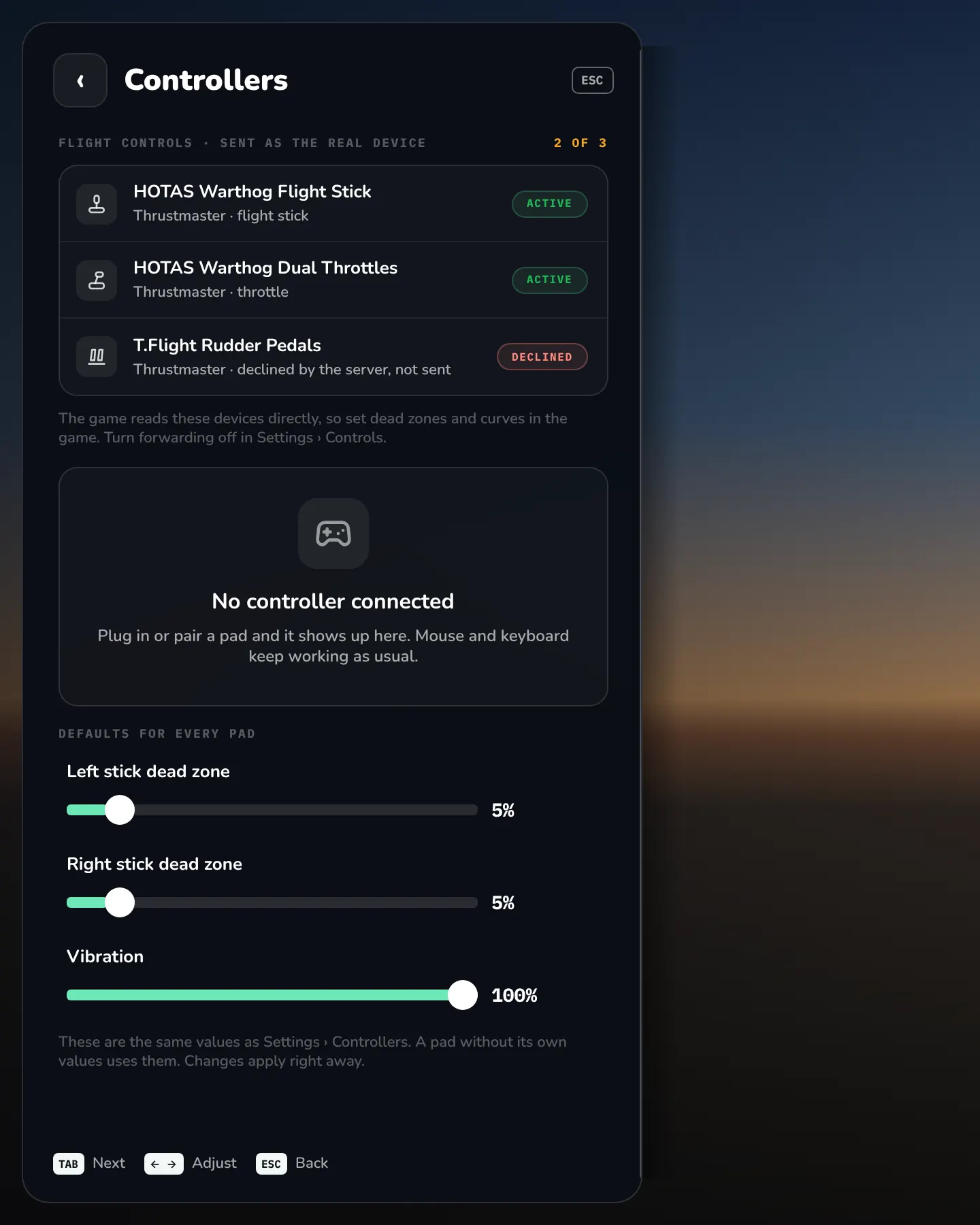
Anti-AFK#
Ctrl+Shift+K turns Anti-AFK on or off for the current stream. While it is on, OpenNOW sends a short F13 key press every 4 minutes so GeForce NOW does not end the session for inactivity. Anti-AFK starts off each time you launch a game. In console mode, a badge shows while Anti-AFK is on (showAntiAfkIndicator).
The desktop stream also shows the ANTI-AFK ON badge, the session menu has an Anti-AFK toggle, and Settings → Stream has the indicator and reminder settings.
Keyboard#
Choose Settings → Controls → Keyboard layout (desktop and console share one list). Pick the layout that matches your physical keyboard. OpenNOW sends it to GeForce NOW when a session starts. The setting key is keyboardLayout (default "en-US").
The layout is fixed for the session when it starts. Changing it during a stream does not remap the active session. Restart or resume the session after changing it.
Platform behavior
| Platform | Behavior |
|---|---|
| Linux (X11 / Wayland) | Gameplay keys map from physical key positions (XKB keycodes) to the selected regional Windows layout, including AltGr and OEM punctuation (for example German and Swedish). AltGr is sent as right Alt and does not trigger local shortcuts. Unknown layouts and synthetic key events without a scan code fall back to the logical key. |
| Windows | Uses the platform's virtual keys and physical-key mapping. In dev, the right Shift, Control, and Alt keys are sent as right-side keys, and Control with right Alt counts as AltGr and does not trigger local shortcuts. |
| macOS | Uses the platform's physical-key mapping, including native keycode zero. |
Dead keys are sent as key events, and the remote Windows layout composes the character. Chinese layouts (zh-CN, zh-TW) provide physical keys for the remote IME; they do not transmit locally composed IME text. Dvorak, Turkish F, French BÉPO, and similar variants are not available as separate choices.
Supported layouts
| Label | Value | Also accepted |
|---|---|---|
| English (US) | en-US | |
| English (UK) | en-GB | |
| Turkish Q | tr-TR | |
| German | de-DE | |
| French | fr-FR | |
| Spanish (traditional) | es-ES_tradnl | es-ES |
| Spanish (Latin America) | es-MX | |
| Italian | it-IT | |
| Portuguese (Portugal) | pt-PT | |
| Portuguese (Brazil) | pt-BR | |
| Polish | pl-PL | |
| Danish | da-DK | |
| Norwegian | nb-NO | |
| Swedish | sv-SE | |
| Finnish | fi-FI | |
| Russian | ru-RU | |
| Ukrainian | uk-UA | |
| Japanese 106 | ja-106 | ja-JP, Japanese106 |
| Korean | ko-KR | |
| Chinese (Simplified) | zh-CN | |
| Chinese (Traditional) | zh-TW |
The core rejects any other value. A saved alias keeps working and is sent as the canonical value.
Pointer lock and mouse#
- By default the stream view follows the game's cursor. When the game hides its cursor, OpenNOW switches to relative mouse mode and locks the pointer. When the game shows a cursor, OpenNOW uses absolute mode. On macOS in
dev, capture follows Settings → Controls → Pointer lock instead, so the game's cursor messages no longer decide it. F8(shortcutTogglePointerLock) overrides the automatic choice and grabs or releases the mouse. On macOS indevit flips the saved Pointer lock setting, the Ctrl+G menu shows the same ON or OFF state, and turning it off shows a Pointer lock is off notice with an Enable pointer lock button.- Focus loss and overlays such as the session menu release the pointer and all held input.
- On Wayland, relative mode uses the pointer-constraints and relative-pointer protocols. On macOS it uses CoreGraphics pointer capture. On Windows the cursor is confined to the stream view while captured.
- Settings → Controls → Mouse sensitivity (
mouseSensitivity, default1, range 0.1–3.0) is passed only to the external renderer process in v1.0.3. The embedded stream view does not apply it.
Gamepad#
OpenNOW uses SDL3 for controller discovery and input. Controller input pauses while the OpenNOW window is not active. Up to four controllers are sent to the session, one per player slot. Sony controllers are forwarded through native HID sessions.
Dead zones are radial. Stick movement inside the dead zone is ignored, and the remaining travel is rescaled to the full range. Both sticks default to 5% (range 0–50). Set 0% to leave dead zones to the game. Vibration from the game is scaled by Controller vibration (0–100%, default 100%); 0% turns it off.
Settings → Controls → Controller input source chooses All controllers (multiplayer) or one device as Player 1, for a controller that appears twice. The choice lasts until OpenNOW restarts. If that device disconnects, the setting shows Selected controller disconnected; select it again after reconnecting.
Outside gameplay, controllers drive the OpenNOW interface when Controller input (controllerMode) is on. Ownership moves between the interface and the stream with neutral states, so no button stays pressed in the game.
Settings → Controls → Gyroscope (enableGyroscopeControls) is stored, but v1.0.3 does not send motion data.
| Setting | Description |
|---|---|
controllerMode | Lets controllers drive the OpenNOW interface outside gameplay |
launchInConsoleMode | Start in console mode |
switchToConsoleOnPad | Enter console mode when a gamepad is the only input |
leaveConsoleOnPointer | Leave console mode on keyboard or mouse input |
consoleProfilePickerOnLaunch | v1.0.2 only. Stored but not read; it is no longer a setting in v1.0.3. See Configuration |
autoFullScreen | Enter fullscreen when the session is ready |
controllerLeftStickDeadzone / controllerRightStickDeadzone | Stick dead zones in percent |
controllerProfiles | Per-controller dead zones and vibration |
controllerVibrationIntensity | Rumble intensity |
In the app · Console mode › Settings › Input & controllers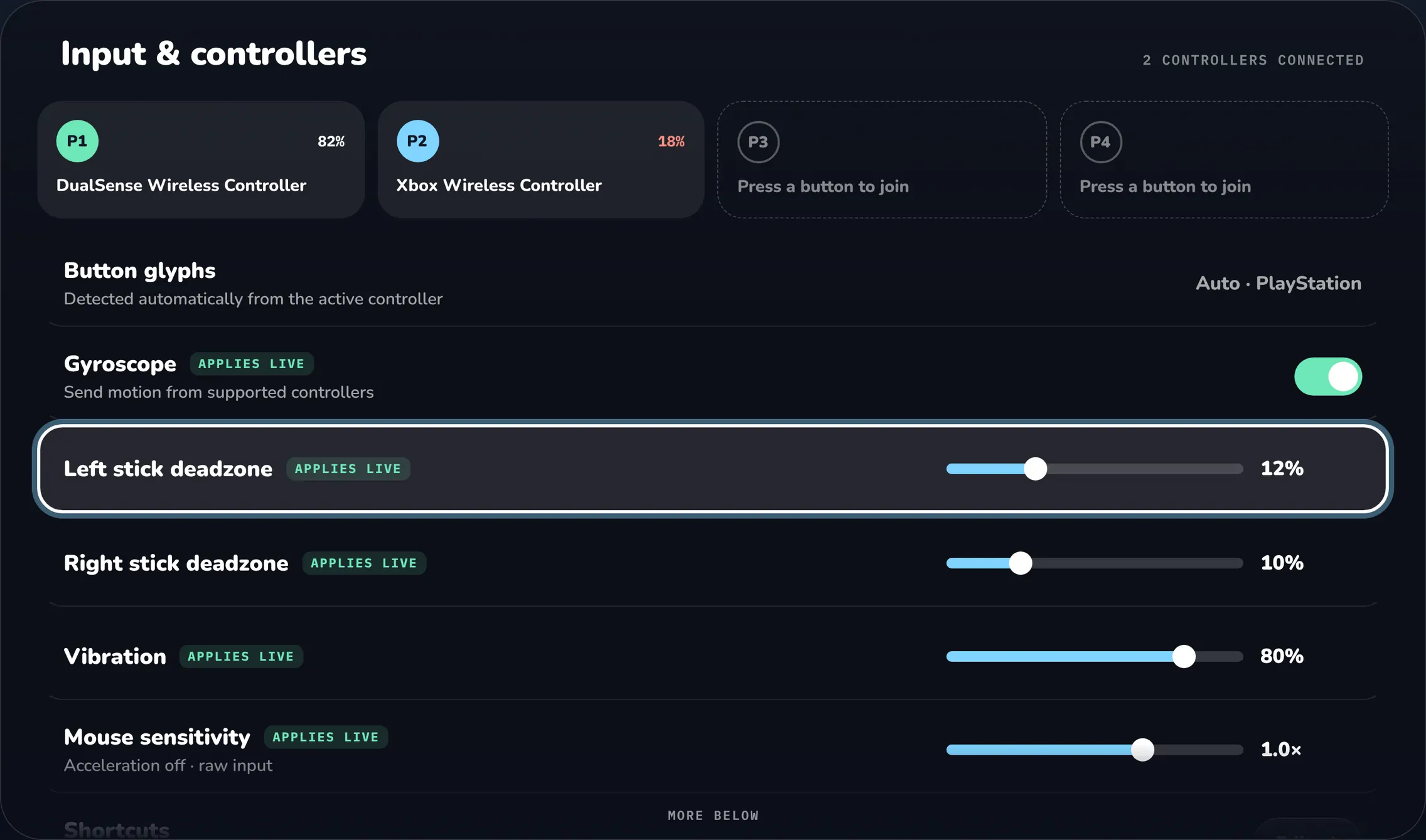
Flight controls and wheels
Supported flight sticks, throttles, rudder pedals, and wheels reach the game as the real HID device, not as an Xbox controller. Games read every axis, button, and hat switch. The supported list has 18 USB vendor and product IDs from Thrustmaster, Logitech, Saitek, and Mad Catz, including the HOTAS Warthog, T.Flight, TWCS, X52, X56, and Logitech G29/G920/G923/G PRO/RS50 families. A device on the list can still be declined by the server; a declined device stays idle and is not turned into a controller.
Settings → Controls → Forward flight sticks and wheels as native devices (forwardFlightControls, default on) controls this. When it is off, a device that SDL recognizes as a gamepad is sent as an Xbox controller with fewer axes and buttons, and other devices are ignored. Settings and the Ctrl+G Controllers page list each device as ready, active in the session, or declined by the server. In dev, while forwarding is on, the statistics overlay (Ctrl+N) also lists each device that is not active, with its status. On Linux, a device whose hidraw node OpenNOW cannot open for reading and writing shows NO PERMISSION instead: it is not sent to the game, and OpenNOW picks it up once a udev rule grants access to that node. On Linux in dev, a supported device with no hidraw node at all shows NO HID PATH instead: it is not forwarded, so check its kernel driver, or turn forwarding off to use it as a controller.
Input to these devices stops when OpenNOW loses focus, when a local overlay opens, and when the session ends, and buttons are released first. Set dead zones and curves in the game. A T.Flight HOTAS 4 must enter HID mode before each session: unplug it, hold SHARE + OPTIONS, and reconnect USB.
Clipboard paste#
Settings → Controls → Clipboard paste enables local-to-stream plain-text paste while streaming. The native path submits text through the streamer FFI rather than converting every paste into keystrokes when the typed clipboard path is available.
Press Ctrl+V (Command+V on macOS) in the stream to paste. The text must be valid UTF-8, up to 64 KiB, with no NUL characters. Held modifier keys are released in the game before the text is sent. An empty or too-large clipboard shows a paste failure. There is no automatic clipboard sync.
Microphone#
Set the mode in Settings → Audio → Microphone (microphoneMode).
| Mode | Label | Behavior |
|---|---|---|
disabled | Disabled | No microphone capture (default) |
voice-activity | Open microphone | Sends audio from the system default microphone continuously during supported sessions |
The mode applies to the next session. With Open microphone, Ctrl+Shift+M mutes and unmutes during the stream, and the session menu has the same toggle. The option is disabled when the native runtime reports no microphone support. Grant the operating system's microphone permission to OpenNOW.
Data channels#
The native NVST bundle opens these SCTP data channels:
| Channel | Reliability | Traffic |
|---|---|---|
control_channel_reliable | ordered, reliable (SCTP stream 0) | Input handshake, keyboard and mouse-button input, Unicode text, control commands, server cursor updates |
custom_message_on_sctp_private_reliable | ordered, reliable (stream 2) | Opened with the bundle; OpenNOW sends nothing on it |
custom_message_on_sctp_private_partially_reliable | ordered, at most 2 retransmits (stream 4) | Opened with the bundle; OpenNOW sends nothing on it |
control_channel_partially_reliable | unordered, 300 ms lifetime (stream 6) | Mouse motion and partially reliable control, including Mjolnir NACK-v2 requests |
control_channel_unreliable | unordered, no retransmits (stream 8) | Opened with the bundle; OpenNOW sends nothing on it |
input_channel_partially_reliable | unordered, 300 ms lifetime (stream 10) | Gamepad state |
cursor_channel | ordered, reliable (stream 12, when negotiated) | Cursor notifications, when a host sends them here instead of on the reliable control channel |
rtcp_on_sctp_private | ordered, reliable (stream 14, when negotiated) | RTCP feedback when video runs on the bundle instead of the Mjolnir socket |
See Native Streamer for the production input path and Protocol notes for the Electron-era channel notes and the WebRTC compatibility mode.